Looking for a Givebutter Alternative?

Givebutter looks free because its cost shows up as a donor tip prompt at checkout. With CoreCause there is no donor tip prompt, and donors can cover the processing fees, so 100% of every gift reaches your nonprofit.

See all CoreCause features →

CoreCause vs Givebutter at a Glance

Side-by-side on the model differences that actually affect your donors and your finance team.

What mattersCoreCauseGivebutter
Cost modelNo transaction fees, donors cover the fee. Turn it off for interchange-plus pricing. Monthly and texting fees apply.No nonprofit subscription fee. Cost comes from donor tip prompts.
Donor tip prompt at checkoutNone. Ever.Default-on platform tip prompt
Processing feesDonors can cover it, so 100% of each gift reaches you.Bundled per-transaction rate
Deposit speedNext business day on averageVaries by payout configuration
Recurring giving + Automatic Card UpdaterBoth includedRecurring included; card updater varies
Designated funds & restricted givingUnlimited funds, donor-selectableSupported
Contract lengthMonth-to-month, cancel anytimeNo contract

Givebutter details based on publicly available product pages and policy descriptions at time of writing. Confirm current Givebutter pricing and features on givebutter.com before deciding.

Customized Campaigns

Build branded donation pages tailored to each initiative. Set goals, tell your story, and track progress in real time.

Donor Management

Keep detailed donor records, track giving history, and build lasting relationships with your supporters.

Recurring Donations

Set up automatic monthly giving so donors can support your mission on autopilot with no extra effort required.

Texting Campaigns

Share campaigns and reach donors via text message. Perfect for events, galas, and engaging supporters wherever they are.

Automated Receipts

Every donor automatically receives a tax receipt the moment they give. No manual work required.

Debit / Credit / ACH

Accept debit, credit, and ACH with no extra setup.

Donate to Funds

Let donors direct gifts to specific funds or programs within your organization.

QR Codes & Payment Links

Generate QR codes and shareable links instantly for emails, flyers, social media, and in-person events.

PCI Compliant

Bank-level encryption on every transaction. Your donors' payment data is always protected.

Ready to Switch From Givebutter?

Book a 20-minute switch call. We will walk through donor migration, your new donation page, and the tip-prompt-free checkout experience.

Donors Cover The Fees

Donors cover the fees. You keep the whole gift.

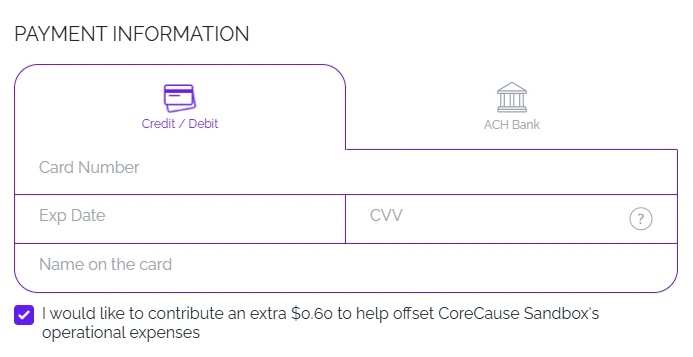
CoreCause never prompts donors to tip the platform. It only offers them the option to cover the processing fee at checkout.

STEP ONE
1
A donor gives
Every online donation carries a processing fee, the cost of moving money securely.
STEP TWO
2
They cover it
At checkout, CoreCause asks if they would like to cover that fee. Most donors happily opt in.
100% TO YOUR CAUSE
STEP THREE
3
You keep 100%
When a donor covers the fee, the full amount they gave reaches your cause.

Processing fees apply to every donation. CoreCause simply gives donors the option to cover them, and it is always their choice, never forced or pre-checked.

Comparing your options? Read How to Choose a Donation Platform for Your Nonprofit.

Common Questions

Frequently asked questions

Givebutter is free for the nonprofit but funds itself with a donor tip prompt on every gift. Nonprofits who dislike that switch to CoreCause, which never prompts donors to tip and instead lets donors cover the processing fee.
Yes, free for the nonprofit on the base tier, but funded by prompting donors to tip. The nonprofit doesn't pay directly, so the donor often does.
No transaction fees, donors cover the processing fee, so 100% of every gift reaches you. Turn it off for interchange-plus pricing. A monthly platform fee and texting fees apply.
Yes. Onboarding covers your Givebutter exports, rebuilding top campaigns, and sending recurring donors the new link so no one is double-charged.
The biggest change is checkout. Givebutter shows a tip prompt; CoreCause shows none, though donors can opt in to cover the processing fee via Platform Fee Offset.
Most nonprofits complete the switch in two to five business days. Once underwriting clears, you set up your donation page and send recurring donors the new link.

What Changes the Day You Leave Givebutter

No donor tipping. Ever.

Your donors never get prompted to add a percentage on top of their gift to cover platform costs. Their full donation goes to programs and services. Givebutter funds itself with a default-on donor tip prompt that quietly redirects donor dollars away from your nonprofit.

Donors can cover the fees.

At checkout, donors can choose to cover the processing fee, so 100% of their gift reaches your programs. It covers the real processing cost, and it is never a tip prompt.

Automatic Card Updater.

When a recurring supporter's card expires or gets replaced, CoreCause refreshes it through the card networks automatically. Most platforms make you chase them to re-enter their card. We do not.

Next-business-day payouts.

Donations clear to your account by the next business day. Many donation platforms take several days to deposit, and some payout services take even longer.

Real human support.

Email within one business hour. Real phone support. Real account managers. Not a chatbot that loops you back to a help article when something breaks during a campaign.

No contracts. Cancel anytime.

Month-to-month with no long-term contract. Explore the platform before you commit, and cancel anytime from your settings.

Talk to Sales

Have a question? Drop us a note and we'll get back to you fast.

★★★★★
No donor tipping. No contracts. Cancel anytime.

Message sent!

Thanks for reaching out. Our team will get back to you within one business day.

Switch to CoreCause

Complete this form and our team will have your account ready.

Organization Information
Authorized Signer
★★★★★
No donor tipping. No contracts. Cancel anytime.

Application Submitted!

Our team will review your information and have your account ready. Check your email for next steps.